Docs as Tests: the series! OK the name needs work, but this is my first post in what I expect to be a series of [at least 2] Docs as Tests posts (and probably some videos as well)
Table of Contents
EDIT 6/30/25: I have created a companion video that illustrates the points of this post (and more). Just want to see a demo of Docs as Tests in action? Use this link to jump straight there.
The Book
Welcome! If you’re here, you probably heard about this phenomenon called “Docs as Tests”, which Manny Silva coined and then went on to write the Docs as Tests book.
First off, let me be clear that I am not affiliated with the Docs as Tests book, but as a technical writer I read it and I thought it was really cool and definitely worth reading. (I can vouch for the Kindle version being well put together, but there is a paperback version as well—either way, it’s worth your time!).
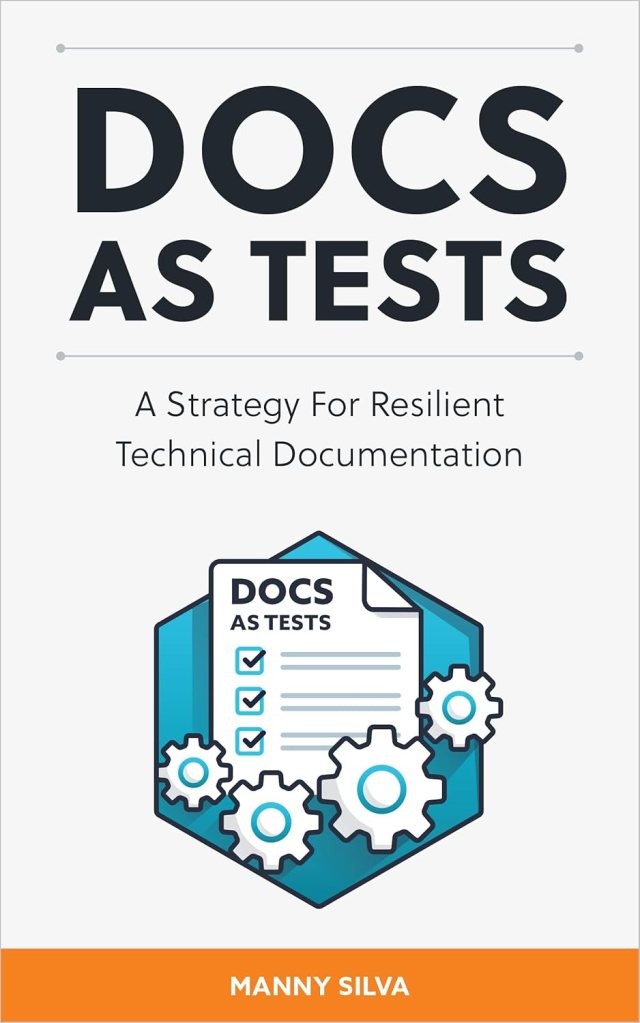
DISCLAIMER: I will try to make it extra clear where possible, but you can basically assume everything I am going to say in this post was either pulled directly from the Docs as Tests book or heavily inspired by it.
The Promise
After reading the Docs as Tests book, I am confident that the Docs as Tests discipline can solve many business problems related to documentation. In the book, Manny goes into great detail how this bit of tech can help you test with docs for that part of the stack.
The Goods
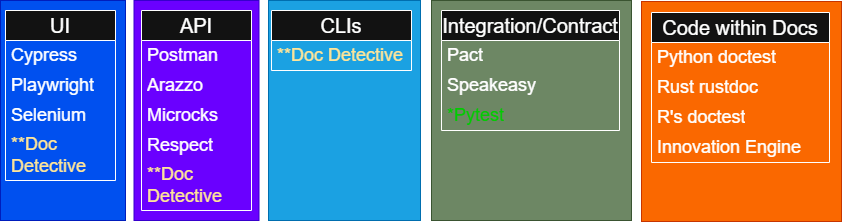
However, if you’re not a software engineer (or perhaps even if you are, as I was!), you might be intimidated by the amount of tools mentioned in the book. Some examples:
NOTES:
* I added Pytest because I have used it for integration testing
** Doc detective is kind of a unicorn in that it seems to be capable of testing in multiple areas
I did my best to break the tools down by test surface area, but I suspect some of these tools are more versatile (i.e. – they can test more areas) than the graphic would suggest.
And You Showed Me the Tools Why?
Oh, right I’m trying to make you more comfortable 😊
First, before going anywhere with Docs as Tests, one helpful strategy is to redirect your overwhelm into curiosity. Another way to put this is to acknowledge you are going to have “What the heck is that?” moments, and focus on the stuff that you can understand.
Second, if there’s one thing I learned as a developer it’s that scope matters. A lot. Don’t bite off more than you can chew!
In the book, Manny suggests (and I agree completely) that you need to decide which areas (e.g. – UI, API, etc.) that you want to begin improving with documentation testing. (You might have multiple areas that can be improved, but you should start with a small win and go from there).
What Success Looks Like
You may have already clocked it based on the tooling discussion above, but one frustrating thing about Docs as Tests is that a successful testing implementation for Company A might look very different from Company B’s implementation. In other words, it depends on your environment and answers to questions like:
- Do your docs describe the behavior of a UI, an API, or both?
- Do you have code samples that developers can run?
NOTE: this isn’t a complete list of guiding questions, but hopefully these are enough enough to get your docs testing gears turning ⚙️
Demo
Before going any further, I wanted to mention that Manny Silva recently showed off v3 of his Doc Detective tool in this video, which includes some examples like the one I’m about to show.
Although there is often a place for a deep dive showing how something works (stay tuned for more Docs as Tests content here), I also think there’s value in distilling one potential approach down to a few screenshots. So let’s begin!
First, consider the sign-up page below for a product:
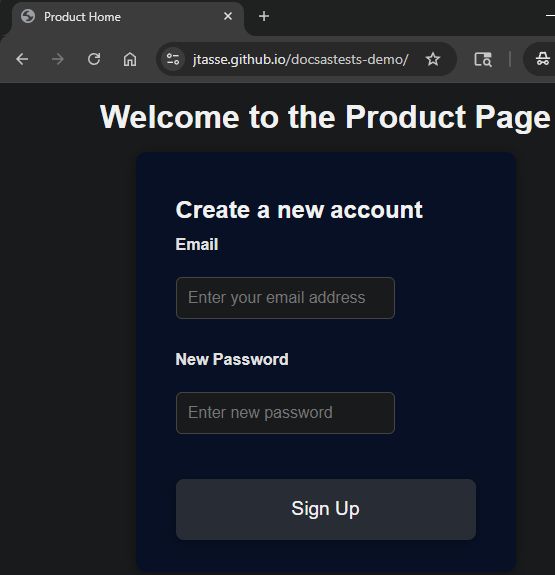
Now suppose that we have the following documentation (in markdown) instructing end users how to sign up using this page:
1. Navigate to [Product Home](https://jtasse.github.io/docsastests-demo/index.html)

2. Enter your address in the **Email** field.

3. Enter a password in the **New Password** field.

4. Click **Create Account**.
Have you spotted the problem yet? 🤔
No worries if not. Let’s see what Doc Detective can find.
"result": "FAIL",
"resultDescription":
     "No elements matched selector or text.",
     "find": "Create Account",
Oh no, it looks like that blasted development team has done it again! 🤬 As the above Doc Detective test result shows, the test failed because the text of the button on the product page no longer matches the documentation.
So what?
Isn’t this cool?! OK, I hear you, failing tests are a bummer. But think about what this means (again, just repeating the logic from the Docs as Tests book):
You can use tools like Doc Detective to catch discrepancies between your product and docs before the product even releases!
And from the devs come testing riches
DISCLAIMER: below is probably an oversimplification of how software testing works (and how messy it can be), but hopefully it communicates the power of what documentarians can now access
Let me try to put the above revelation into a different context. I worked as a software developer for about 7 years. For probably every product I worked on, myself and other devs would write tests that would run every time a new change is introduced to the software.
If a test failed, it meant that a developer had made a change that didn’t play nice with some existing functionality. They broke something.
I don’t recall documentarians/technical writers ever having access to anything like that. Sure there are lots of tools to check spelling, grammar, style; and those are still important.
But now technical writers armed with tests like the one I demoed above can say:
Hey, dev team: you broke my docs*
* you might want to say it a little nicer than that, as developers are people just trying to get their stuff done, too (see: the Agile Prime Directive)
What’s Next
If you’re feeling brave, you can clone the GitHub repository that I used for the demo in this post.
But fear not if you stopped learning about cloning with Multiplicity (Michael Keaton’s best work?). I intend to do a deeper dive into how Doc Detective (and maybe other testing tools) work in my next post.
I also plan produce a related video or two, if that’s more your speed.
Until then, happy testing. 😎


 James.Tasse
Leave a comment