Abstraction — Part II: Gen AI and the WYSIWYG Revolution
Previously On
In the last post, I traced the path of abstraction from the days when machines were programmed with machine code (often represented in binary) to the dawn of Assembly code and even higher level languages like FORTRAN, which made possible software like Bravo, the first WYSIWYG (what you see is what you get) editor.
The Old Ways
But abstraction can take more than one form. And so can the WYSIWYG as an idea. Allow me to equivocate. Traditional WYSIWYGs like Microsoft Word or Photoshop show the user what they're getting–with some margin of error–before they print the document or share the image on social media.
This is undeniably useful, as it allows the user to produce a document or an image without having to know how to program a printer or the internals of assigning colors to pixels on a screen.
The Cost
However, there is still a cost to using WYSIWYG editors. Microsoft Word requires the user to learn how to use its controls in order to style text, create lists, tweak line spacing, and specify how a document should be printed. Similarly, Photoshop requires engagement of its layer system and a dizzying array of tools that might take years to master.
So imagine if you could go back just 5 years and tell a user of these or many other WYSIWYG editors that they could produce documents, images, and other outputs not just by interacting with an editor; but by talking to a chatbot.
Drawing in English
I think it's time for an example.
Suppose I want to create a picture of a cat. Let's start with a traditional WYSIWYG editor. I don't have access to Photoshop, but I do have the GNU Image Manipulation Program. A quick warning: I can draw diagrams, but not at all beyond that.
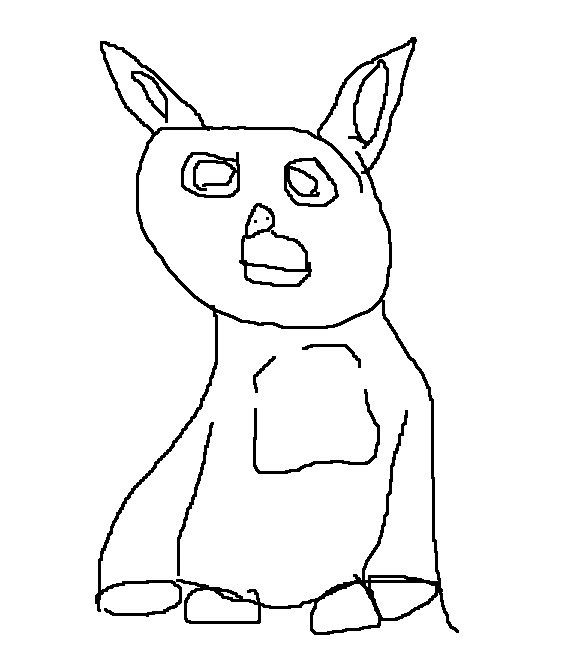
Let's just pretend that abomination never happened. OK, now I'll ask Gemini to "Give me a drawing of a cat".

So much better! But, of course, this is unfair to people who can draw using tools like Photoshop. So here's an image that appeared in Google results from 2010 (before modern AI image generation was widely available):

Maybe not as detailed as the Gemini image, but pretty good, right?
Reactions
I would say there are a number of valid reactions to the gen AI example above:
- *Amazement* I barely gave you anything and you made a beautiful cat drawing.
- *Horror* I barely gave you anything and you made the most beautiful cat drawing I've ever seen.
- *Unimpressed* That's about as pretty as the last 100 cat drawings an LLM generated for me.
Polarizing. I think that's a good word to describe generative AI's image generation capabilities.
The Gen AI Layer(s)
I think the drawing exercise is a fun illustration of how generative AI (gen AI) can abstract the creation of an image to a simple chat interface. Again: "Give me a drawing of a cat".
But gen AI is not just an abstraction of the WYSIWYG editor (although it can be–today Gemini offered to sort a spreadsheet for me so I didn't have to 😹). No, gen AI is an abstraction layer over everything.
OK, that feels a bit strong. I can't abstract the activity of feeding my cats to ChatGPT...right?
So it would be more accurate to say that Gen AI is an abstraction over many types of computer-mediated tasks. I talked a lot about abstraction layers in the previous post, so let's close the loop on that with some diagrams.
Abstraction Diagrams
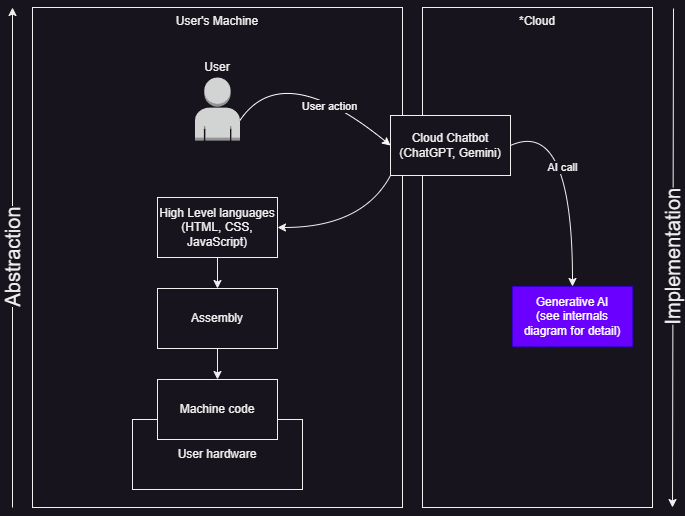
First we'll start with a high-level diagram which shows what a user interaction with a gen AI chatbot looks like.
NOTE: here I show AI as existing in the cloud. Although this is true for most chatbot users, it's worth pointing out that many people run LLMs locally on their machines.
Notice how the Cloud Chatbot is mostly situated in the
'Cloud' area, with a small portion residing in the 'User's Machine'
area. Although I would shift this a little further to the left if I
were referring to an installed variant like Claude Desktop; here I
am referring to the chatbot experience you get in a browser by
visiting https://chatgpt.com/ or
https://claude.ai/.
Chatbot Diagram
Generative AI detail
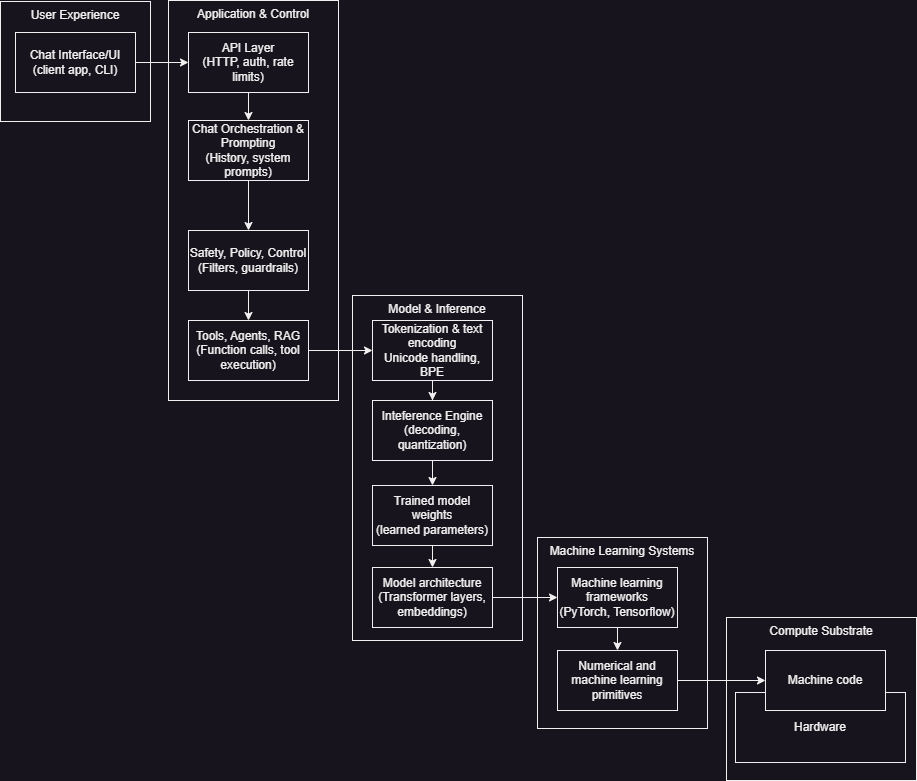
But what about that purple Generative AI box? Hah,
well, I asked ChatGPT for a rundown of all the different abstraction
layers within the generative AI stack, and it's…out of the scope of
this blog post. I would almost go so far as to say its level of
complexity represents an
information hazard
(a slight exaggeration) to our aim of trying to understand
higher levels of abstraction. So I'll put the diagram below, and you
can feel free to take it in or ignore it.
Coding Assistants
All right. Chatbots are one thing. But what about coding assistants like Claude Code, GitHub Copilot, or Gemini Code Assist?
To be fair, I'm doing a bit of hand-waving/oversimplification in the diagram below. It accurately describes my development environment–and I suspect many others–but it's worth pointing out that one can use command line interfaces (CLIs) like git via a terminal like Bash or PowerShell outside of a development environment (IDE). Furthermore: I'm also hiding the fact that both I and coding assistants will often interact with both local and cloud CLIs like Node Package Manager (npm) and GitHub's, respectively, often within the same coding session. Not to mention the fact that I will sometimes bypass the coding assistant and write some code myself!
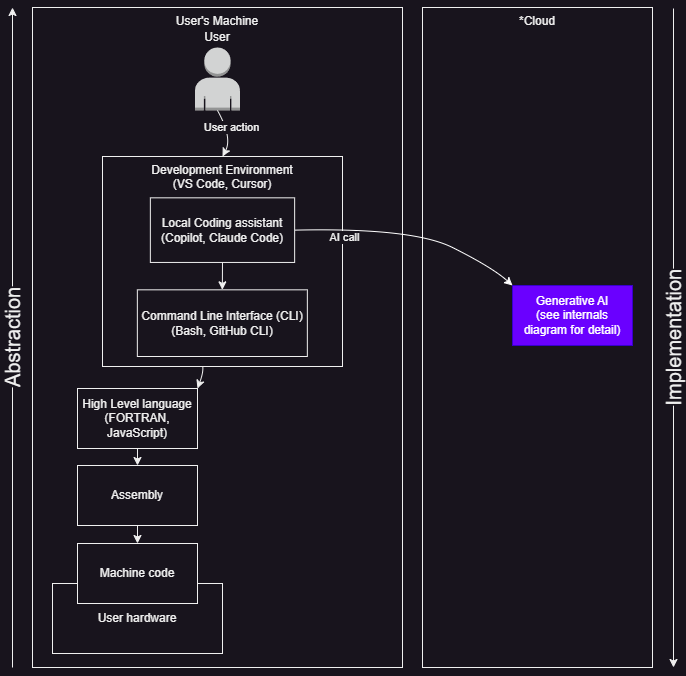
Now that we've got a handle on what the abstraction layers look like from the metal to the coding assistant, let's talk about what this means for the act of coding.
Programming in English
By now you've probably heard the phrase "vibe coding". Excuse me while I vomit.

OK, I'm back. Sorry, I just hate this phrase, which manages to be both seductive for the uninitiated and repulsive to those who see it only as a path to production disaster. It can be both of these things, but it can also be something else: a useful tool.
For the remainder of this post, then, I am going to stick with one stilted but connotationless way of communicating the concept: "programming in English".
NOTE: I'll try to come up with something catchier, but obviously I failed if you still see "programming in English"
Such Power
But precision still matters! And oh my goodness, modern WYSIWYG editors are MUCH more precise than gen AI chatbots. Really, the more I think about it, the whole "what you say is what you get" idea of chatbots giving you what you ask for is…quite a stretch.
I think an analogy is helpful here. Say you have a dartboard. You want to hit the bullseye, so you throw your dart. If you're working in a traditional WYSIWYG like MS Word, chances are the result will come pretty close to that bullseye. Now suppose that you're working with gen AI. You've asked it for an image, a document, or some code to accomplish a task. Not only is there a significant probability that you won't hit the bullseye–it's very possible that the result will hit the bullseye of some dartboard you didn't know existed.
Skill Issue
That's not fair, you say! "I am an LLM maestro when it comes to prompting". This is a valid point. Someone that knows how to use headings and custom styles in MS Word is probably going to produce documents that are closer to what they want than someone that hammers the bold control and abuses the format painter.
Similarly, if I know how to write good acceptance criteria that detail what I want an application to do in various scenarios; I'm likely to get better output from a coding assistant than if I just say "Code me an enterprise application that prints money".
Tech Debt
Let's take a step back. Having worked as a software engineer for several years, I am aware of something that haunts every project: technical debt (or "tech debt"). Per Wikipedia, tech debt is:
"...a qualitative description of the cost to maintain a system that is attributable to choosing an expedient solution for its development."
Oof–accurate, but very sterile. To put this another way: in software development, you always have a choice. You can build a feature in a way that is optimal given the [ideal] architecture of the system, or you can build it fast. Occasionally the optimal path is the fast path, but they often call for different approaches. And if you're trying to sell your software to someone else–and Google, Microsoft, & Anthropic are very much trying to sell their coding assistant software to us–the fast path often beats the optimal path.
Over time, if you implement a lot of features via the fast path, it starts to manifest in the product in undesirable ways. This could result in bugs, it could cause performance issues, or it could even lead to a confusing user experience.
I'll give you an example: see that pyramid at the top of the current page (and on just about every page of my website)? Well, after a while it started behaving erratically. It would stop between navigation labels or show the wrong face to the user. Sometimes it even liked to disappear. How does one address this?
Refactoring
At this point, the ideal thing to do is to refactor the code. Going back to Wikipedia:
"Refactoring is the process of restructuring existing computer code—changing the factoring—without changing its external behavior."
Refactoring does not fix bugs on its own, but it often makes finding and fixing bugs (and adding new features) easier.
So you can refactor the code–and eliminate tech debt–or you can keep applying band-aids (patches) and hope that it doesn't all come crashing down.
The Iceberg
Another way to think of an application is as an iceberg. If we consider the case of an application that has a user interface (UI); users only see the UI, which is a visual abstraction of the application's code.
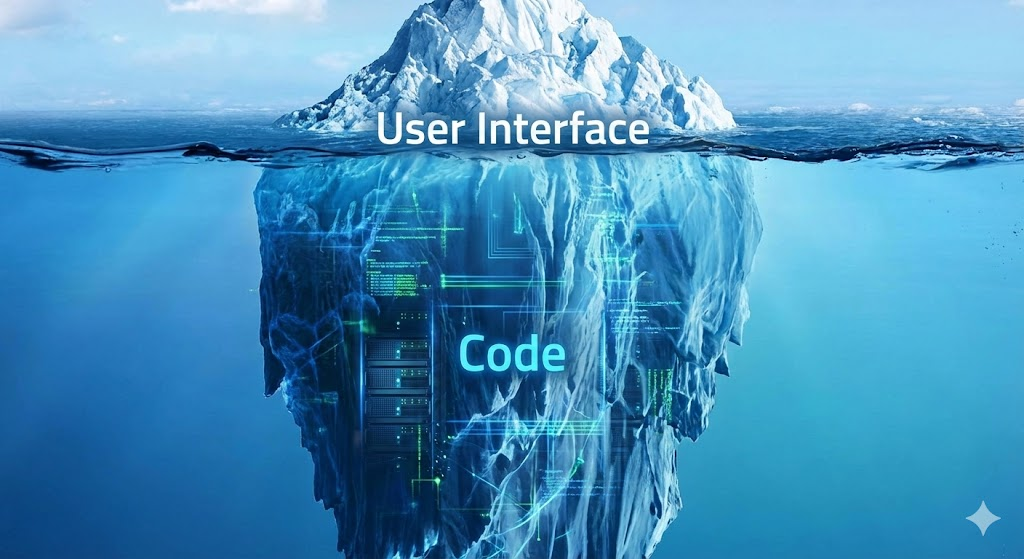
But under the hood, the code might look like a Rolls Royce engine, nicely tuned and well thought out. Or it could look like a Hyundai Theta II engine, of which many "were recalled for catastrophic seizing failure". Yikes!
Here's a fun example: what did the code for the pyramid on my website look like when things had started to go sideways?
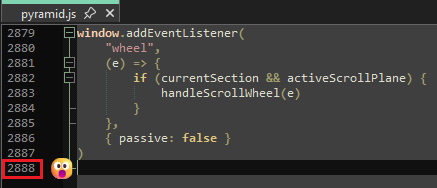
Yes, pyramid.js, which was responsible for the
positioning and animation of the pyramid, had grown to almost 3,000
lines! So how did I fix it?
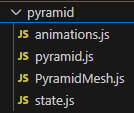
With the help of Claude Code, I developed a refactoring plan that eventually (it was a bumpy ride) got my code into a better state. More specifically, we split up behaviors defined in pyramid.js into 4 files:
Tools
So I have to acknowledge, again, that tech debt–and for that matter the pitfalls of coding as an exercise in turning thought into (abstracted) bits–is not unique to coding assistants. Like so many other devs, I have produced a mountain of tech debt since I worked professionally as a developer (and probably a couple mountains before that just learning how to code) 😅
But being aware of what tech debt is–and how to deal with it–is non-trivial knowledge for anyone who wants to write code with or without a coding assistant.
I recently had a relevant conversation with Gaylin Walli, a Senior Documentation Manager at Fastly. I was struggling to reconcile AI's ability to produce documentation with the cognitive atrophy that can result from having AI do the thing for you.
Gaylin had a calm response to this. Note that with my memory being the sieve it is, I can at best paraphrase it:
"AI is just a tool, right? Every tool has strengths and weaknesses."
This, I think, gets to the heart of the matter. AI, like any other tool, can be wielded poorly or effectively; and like any other tool, practice is likely to improve our results in using the tool.
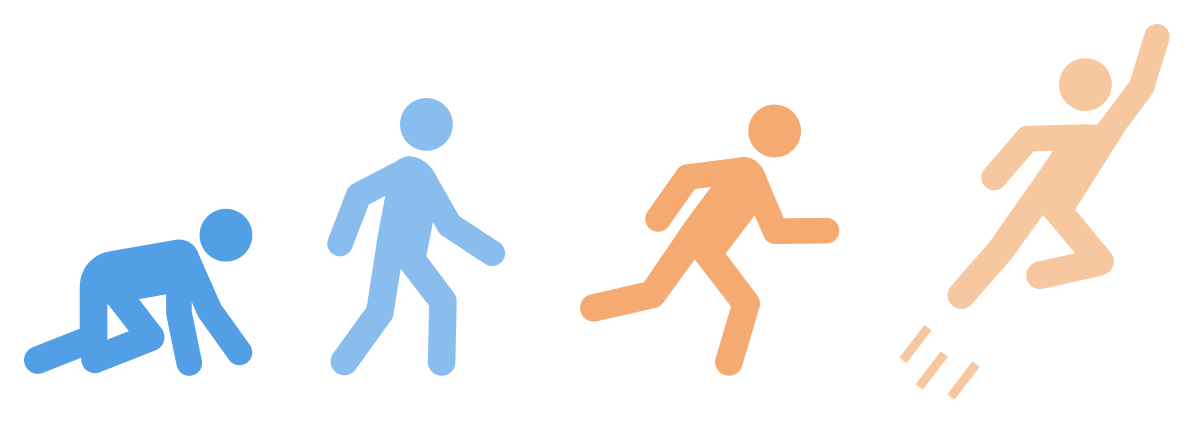
To frame this within the context of software development, we can use the "crawl, walk, run" (and optionally fly) approach. Although you'd want to be careful about using this methodology when building enterprise software, I think it can be very helpful to acknowledge that you're not going to start building software with AI at hypersonic speeds.
During the crawl phase, you'll likely find that your coding assistant often doesn't give you what you want. But as you get better at providing requirements and begin to walk, you'll start to get those "This is [almost] what I wanted!" moments. And if you keep at it, not only will you start to get exactly what you wanted in the run phase; you may find that in the fly phase your prompts even start to set up your coding assistant to improve upon your vision.
So I encourage you to go forth and prompt your favorite chatbot or coding assistant poorly. Eventually you will likely find you get more of the results you want.
Musical Coda
And you no longer seem to cope
With what you ask for
Thanks for reading.
References
- ChatGPT (AI abstraction layers, fact-checking)
- Claude (fact-checking)
- Gemini (fact-checking)
- GNU Image Manipulation Program
- Cat drawing
- Tech debt
- Hyundai Theta II
- Jalopnik article
- arXiv
- Gary Marcus
- IMDb
- OED
- Run LLMs locally
- Hand-waving
- Information hazard
- Acceptance criteria
- Harvard Gazette
- Flaws in the crawl-walk-run methodology
- AWS 'Crawl Walk Run Fly' image
- YouTube (musical coda)