
The what-dash?
If you’re like me, the em dash (—) represents an irresistible (lazy?) way to break up sentences. But, frustratingly, it’s not super easy to use in every context. For example, MS Word and Google Docs will automatically convert 2 en dashes (--) into an em dash. But what if you’re in Notepad or a browser?
Windows
Pure keystrokes (if you have a num pad)
In Windows, you can insert an em dash by doing the following:
NOTE: this solution requires that you have a number pad on your keyboard
- Hold down Alt
- Type
0151 - Release
Alt
Emoji picker
You can also press Windows key + period to bring up the ’emoji and more’ interface and insert an em dash via the ‘Symbols’ tab.

Espanso
These options are fine, if a bit gross. But if you’re open to installing the espanso app on Mac, Windows, or Linux, there is another way.
Steps
- Download espanso and install it.
- Find out where the match configuration lives in your environment.
NOTE: in Windows, you can find it by navigating to
%appdata%/espanso/matchand openingbase.yaml. I am not sure about where to configure matches for other operating systems, so see the docs for those.
- Within the base.yaml file, configure a match.
NOTE: below is the match config I am using, but you can use whatever you want (just be sure to avoid collisions with other keystrokes where possible)
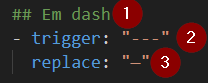
- (OPTIONAL but recommended) heading for the match
trigger: when these keystrokes are entered while espanso is running they will be replaced by the text defined for thereplacevaluereplace: this is the value that will be substituted for the trigger value.
Enjoy!

EDIT 6/30/25: Here’s a copy/paste-friendly version of the config that you can add to your base.yaml file, with a entry for an en dash added as a bonus.
NOTE: apparently yaml (or VS Code reading yaml) doesn’t display em dashes differently from en dashes (as seen in the
replacevalues below), but it does preserve the character information.
If you’d like to verify this yourself, you can copy the characters out of the yaml and paste them somewhere like Notepad or a browser.
  ## Em dash
  - trigger: "---"
    replace: "—"

  ## En dash
  - trigger: "-+"
    replace: "–"

 James.Tasse
Leave a comment